Why ChatGPT can’t see your Commerce7 wines, and how to fix it
More wine buyers now ask ChatGPT or Perplexity what to order before they ever search Google. On most Commerce7 sites those assistants can’t read a single wine. Here is why, how to test your own pages in five minutes, and what fixes it.
 By Dumitru C., 7Labs
Published
6 min read
By Dumitru C., 7Labs
Published
6 min read
Why AI assistants miss Commerce7 wines
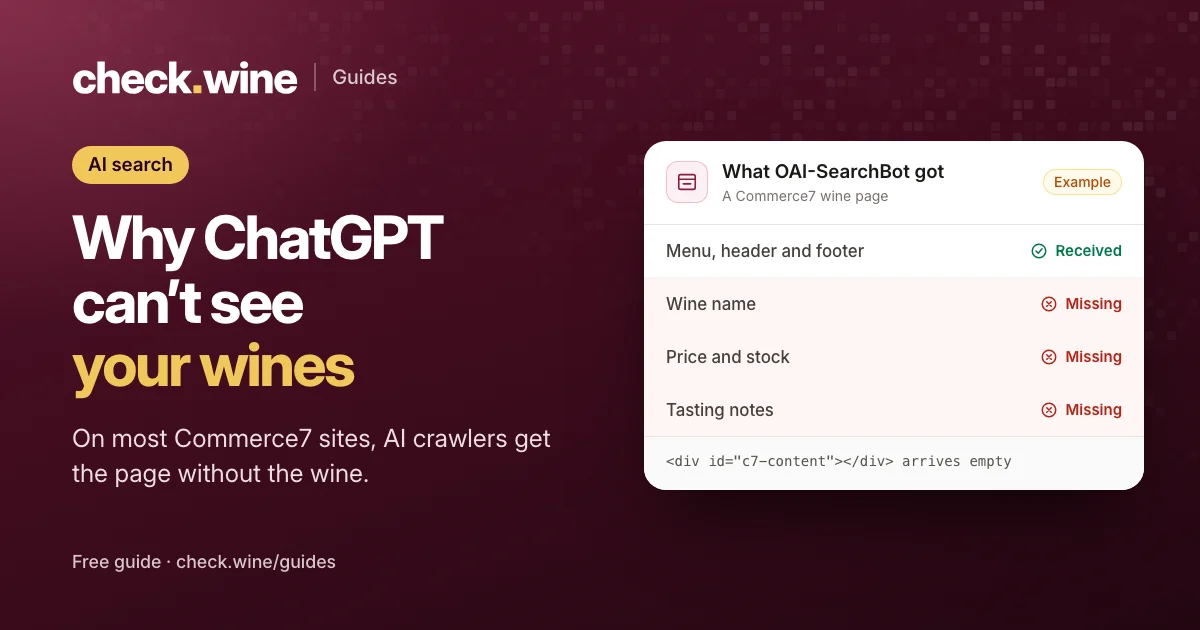
When someone asks ChatGPT for “a Santa Rita Hills Pinot Noir under $60 I can order online”, it doesn’t browse your site the way a person does. With search turned on, ChatGPT sends a crawler called OAI-SearchBot to fetch pages, reads the HTML your server sends back, and builds its answer from what it finds there. Perplexity and Claude work the same way with their own crawlers.
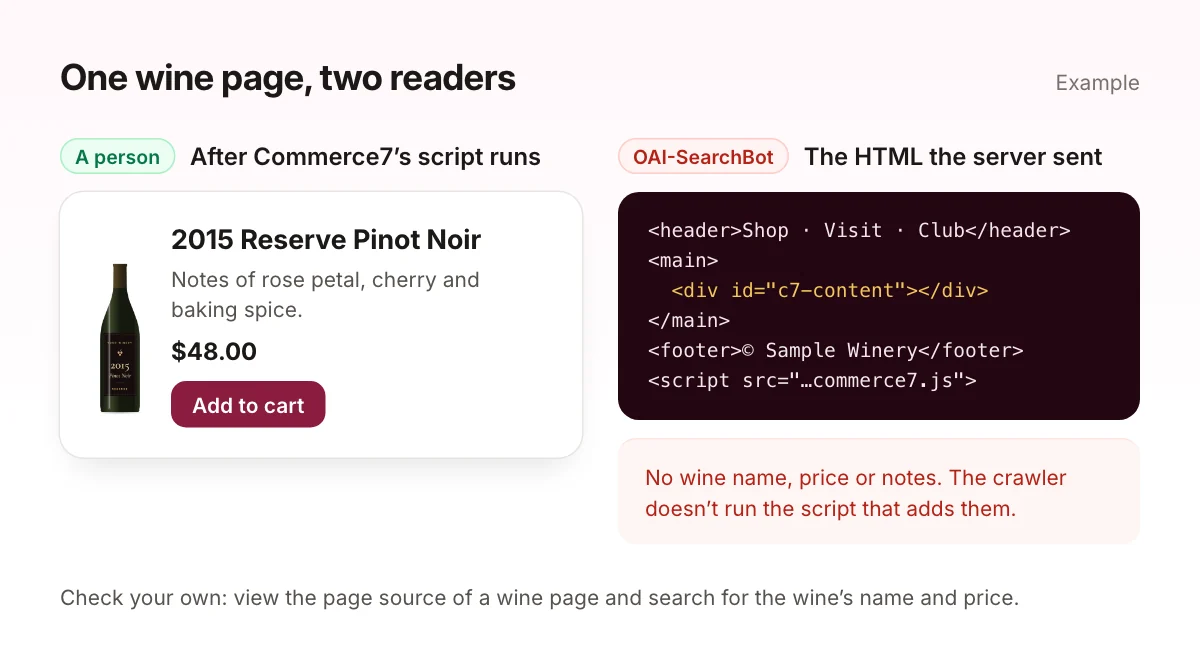
A Commerce7 wine page is built in two steps. Your server sends a page with an empty Commerce7 area in it, then the Commerce7 script runs in the visitor’s browser, asks Commerce7 for the wine, and draws the name, price, notes and buy button. A person never notices the gap. A crawler that doesn’t run JavaScript only ever gets step one.
That is the normal case for AI crawlers. When Vercel and MERJ measured the major AI crawlers across Vercel’s network, none of them rendered JavaScript: they download script files but don’t run them. So on most Commerce7 sites, the page an AI assistant reads has your header, footer and menu, and no wine.
What about Google?
Googlebot does run JavaScript, so Google can usually index Commerce7 wines, though rendering can happen some time after the first crawl. Google’s AI Overviews draw on that index, which is why a winery can show up in Google’s answers and still be invisible to ChatGPT and Perplexity.
Test your own wine pages in five minutes
1. Read the page the way a crawler does
- Open one of your wine pages in Chrome.
- Press
Ctrl+U(Cmd+Option+Uon a Mac) to view the page source. This is what your server sent. The Inspect panel shows the page after scripts ran, so it can’t tell you this. - Press
Ctrl+Fand search for the wine’s full name, then for its price.
If the name only appears in the <title> tag, or not at all, and the price never appears, an AI crawler reading that page learns nothing about the wine.
2. Ask for the page as OAI-SearchBot
If you’re comfortable with a terminal, this fetches the page with OpenAI’s search crawler name and counts how often the wine’s name appears:
curl -sA "OAI-SearchBot/1.0; +https://openai.com/searchbot" \
  https://yourwinery.com/product/your-wine | grep -ci "your wine name"
A 0 means the wine isn’t in the page. An error page or a “Just a moment” challenge means your firewall is turning the crawler away, which is the next check.
3. Check robots.txt and your firewall
Open yourwinery.com/robots.txt. Look for Disallow: / under any of these names. Each one belongs to an AI search product:
| Crawler | Used for |
|---|---|
OAI-SearchBot | ChatGPT search results and citations |
PerplexityBot | Perplexity answers |
Claude-SearchBot | Claude’s web search |
GPTBot, ClaudeBot | Collecting data to train AI models, not search |
Blocking the training crawlers doesn’t remove you from AI search, so you can block those and still allow the search ones. OpenAI, Perplexity and Anthropic each document their crawlers and say their search crawlers follow robots.txt.
robots.txt is only half of it. If your site sits behind Cloudflare, open AI Crawl Control in the Cloudflare dashboard and check that the search crawlers are allowed. Cloudflare can block AI crawlers for a whole domain with one setting, and newer sites may have it on without anyone choosing it. Other firewalls and security plugins have similar bot rules.
4. Ask the assistants
Ask ChatGPT, with search on, a question only your wine pages can answer: “What does the 2022 Estate Pinot Noir from [your winery] cost, and can I order it online?” Then look at the sources it cites. If they are Wine-Searcher, Vivino or an old review instead of your own wine page, it couldn’t use your page. Do the same in Perplexity.
Or run a free check.wine check. It fetches your wine pages as OAI-SearchBot, tells you whether the wine is in the HTML, and reads your robots.txt for each AI search crawler.
What an AI assistant needs from your site
AI assistants recommend wines and wineries they can describe with confidence. For a winery that means:
- Each wine’s details in the HTML. Name, vintage, variety, appellation, tasting notes, price and whether it’s in stock, as plain text on the wine page.
- Product data. A Product schema block with price, currency and availability, the same block Google uses. The wine product schema guide has an example.
- Answers to the questions people ask. Visiting hours, tasting reservations, club tiers and what they include, where you ship. Write them as text on a page, not inside an image or a PDF.
- Listings elsewhere. Assistants also cite Wine-Searcher, Vivino and Google’s shopping results. Keeping those listings current with a product feed means the price an assistant quotes is the right one.
- Crawlers let in. Search crawlers allowed in robots.txt and in your firewall, as above.
Some sites also publish an llms.txt file, a plain-text summary for language models. It is cheap to add, but so far no major AI search product has said it uses one, so treat it as optional.
What not to do
Don’t show AI crawlers a different page from the one people see, and don’t hide text or instructions meant only for bots. Serving crawlers content that visitors don’t get is cloaking, and hidden text is a separate violation; Google’s spam policies forbid both, and either one puts the whole site at risk. The fix is to put the same wine details in the page for everyone.
How to fix it
The goal is one page that already contains the wine when it leaves your server, for every visitor. Commerce7’s script then takes over in the browser as usual. There are three ways to get there.
Have a developer render the wine on the server
Commerce7 has a public endpoint for each product that needs only your tenant ID. A developer can fetch the wine when the page is requested and write its name, notes, price and Product schema into the Commerce7 area of the page. Commerce7 replaces that content with its own widget when the script loads. Watch for a few things we learned building this: keep images in that area lazy-loaded so they don’t delay the shop, leave out the price for allocation-only wines, and refresh the cached content when a wine changes.
Use a pre-rendering service
Services such as Prerender.io run your pages in a browser and hand crawlers the finished HTML. They work on any JavaScript site and are billed by the number of renders. Google calls this approach a workaround rather than a long-term fix. The AI Visibility and Prerender.io comparison goes through the trade-offs.
Use the AI Visibility app
AI Visibility & Shopping Feed is our Commerce7 app. It builds each wine’s content from Commerce7 and puts it into your pages through a WordPress plugin, a Cloudflare Worker, a PHP include or a Node.js module, so every visitor and crawler gets the same HTML. It also sends your wines, prices and stock to Google Merchant Center, Meta, Wine-Searcher and Vivino every hour. It costs from $29.99/mo on Commerce7’s Basic and Pro plans and $39.99/mo on Experience and Enterprise, billed through Commerce7, plus $150 if we do the setup. We make it, so weigh that accordingly.
| Problem | Do it yourself | Or have it fixed |
|---|---|---|
| Wine pages empty for AI crawlers | Server-render the Commerce7 product data, or a pre-rendering service | AI Visibility, $150 setup then from $29.99/mo |
| AI search crawlers blocked | Allow them in robots.txt and your firewall’s bot settings | Part of the AI Visibility setup, or the site health fix ($300) |
| No product data on wine pages | Add Product schema with price and stock | Wine page SEO & link previews, $300 |
Questions
Can ChatGPT recommend my winery if it can’t read my wine pages?
It can mention your winery from other sources, such as Wine-Searcher, Vivino, press and reviews, but it can’t quote your own prices, notes or what is in stock. Those details come from pages it can read.
Does blocking GPTBot keep my winery out of ChatGPT?
No. GPTBot collects training data. ChatGPT search uses a separate crawler, OAI-SearchBot, which you can allow while blocking GPTBot.
Does Google see my Commerce7 wines?
Usually, because Googlebot runs JavaScript. Rendering can lag behind crawling, and wine pages without product data still miss the price and stock Google shows in results.
Is it allowed to show AI crawlers a special version of the page?
Showing crawlers content that visitors don’t see is cloaking, which Google’s spam policies forbid. Put the same wine details in the page for everyone instead.
Does an llms.txt file help?
It does no harm and takes minutes to add, but no major AI search product has said it reads one, so it is not a fix for empty wine pages.
Read next
All guides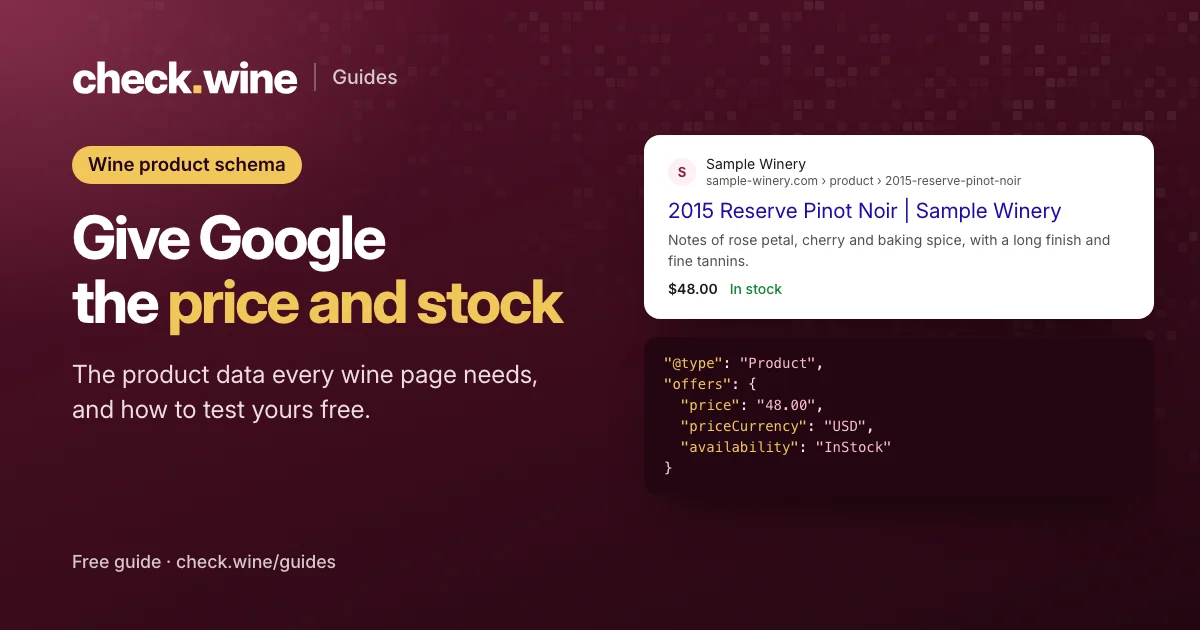 Guide
Guide
Wine product schema for Google
Product structured data for wine pages: the fields Google needs (price, currency, availability), a JSON-LD example, Commerce7 pitfalls and free ways to test it.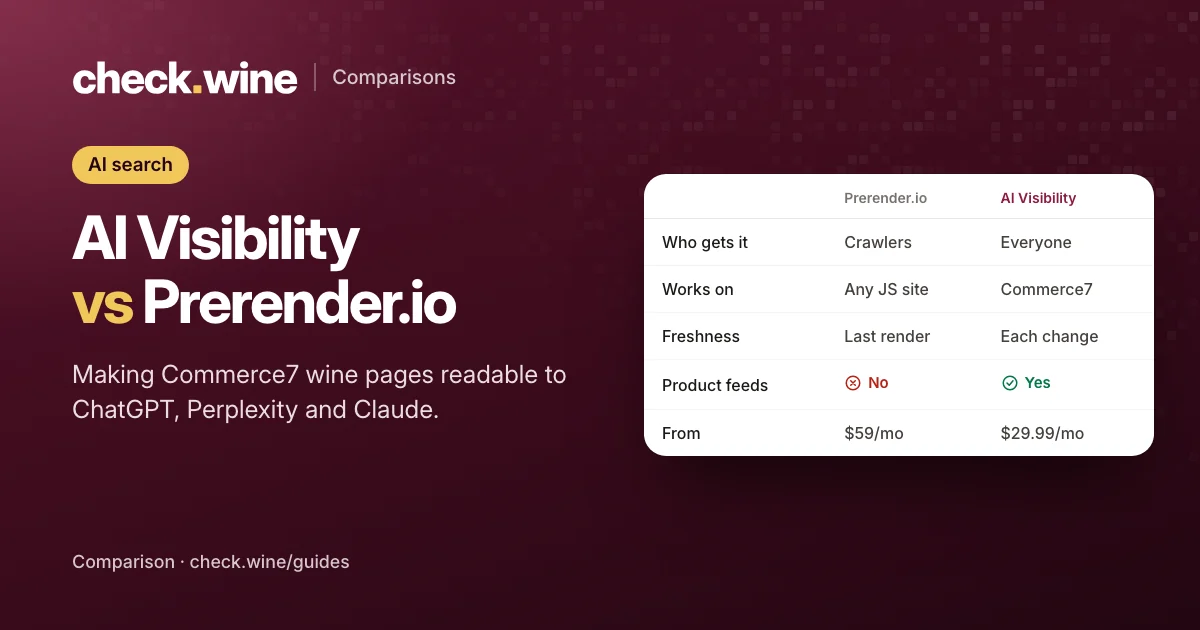 Comparison
AI Visibility vs Prerender.io
Prerender.io, Gorilion’s AI SEO app and AI Visibility all help crawlers read Commerce7 wine pages. How they work, who gets the content, and what each costs. Guide
Guide